The Samsung Odyssey G8 features a stunning OLED display, ultra-fast 175 Hz refresh rate, and a sleek ultra-thin gaming design that instantly stands out in the premium gaming monitor market. If you are looking for a perfect balance between immersive visuals, high-speed gaming performance, and modern smart features, the Samsung Odyssey G8 is a compelling option for both competitive gamers and creative professionals.
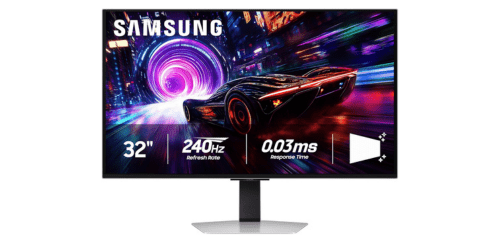
What Samsung Odyssey G8 Offer?
- The Samsung Odyssey G8 has a 34-inch OLED ultrawide display for producing deep blacks, vibrant colors, and exceptional contrast that enhances immersion in games, movies, and creative work.
- Samsung Odyssey G8 features a 3440 × 1440 WQHD resolution for delivering sharp details and a wider workspace that allows users to multitask efficiently with multiple windows open side by side.
- It includes a 175 Hz refresh rate for creating ultra-smooth motion clarity during fast-paced gameplay.
- The Samsung Odyssey G8 has a 0.03 ms response time for minimizing motion blur and ghosting to ensure fast-moving scenes remain sharp and responsive.
- Samsung Odyssey G8 supports AMD FreeSync Premium Pro technology for synchronizing refresh rate with the GPU, reducing screen tearing and stuttering during gameplay.
- It features HDR10+ support for improving brightness and contrast to display more realistic lighting and shadow detail.
- The Samsung Odyssey G8 includes Samsung Gaming Hub for accessing cloud gaming platforms and streaming apps directly from the monitor without a connected PC or console.
- Samsung Odyssey G8 has USB-C connectivity with power delivery for enabling single-cable laptop connection that handles video output, data transfer, and device charging.
- It features an ultra-slim premium design for creating a modern, minimalist gaming setup that fits well in both gaming desks and professional workspaces.
- The Samsung Odyssey G8 includes built-in speakers for providing convenient audio playback during gaming, streaming, or everyday computer use without external speakers.
Pros & Cons
- OLED panel delivers deep blacks and high contrast for immersive visuals
- 175 Hz refresh rate and 0.03 ms response time support competitive gaming
- Ultrawide 34-inch screen improves immersion and multitasking productivity
- AMD FreeSync Premium Pro reduces screen tearing and stutter
- Slim premium design with modern aesthetics
- Smart TV and cloud gaming features built into the monitor
- USB-C connectivity supports simplified workstation setups
- OLED panels may require burn-in management with static content
- Ultrawide aspect ratio may not be supported by some games
- Limited USB ports compared with dedicated docking monitors
Comparison
| Feature | Samsung Odyssey G8 | Alienware AW3423DWF | LG UltraGear 34GP950G |
| Panel Type | OLED | QD-OLED | Nano IPS |
| Screen Size | 34 inches | 34 inches | 34 inches |
| Resolution | 3440 × 1440 | 3440 × 1440 | 3440 × 1440 |
| Aspect Ratio | 21:9 | 21:9 | 21:9 |
| Refresh Rate | 175 Hz | 165 Hz | 180 Hz |
| Response Time | 0.03 ms | 0.1 ms | 1 ms |
| Brightness | 400 nits | 400 nits | 600 nits |
| HDR Standard | HDR10+ | HDR400 | HDR600 |
| Color Depth | 10-bit | 10-bit | 10-bit |
| GPU Sync | FreeSync Premium Pro | FreeSync Premium Pro | G-SYNC Ultimate |
| HDMI Ports | 1 × HDMI 2.1 | 2 × HDMI 2.0 | 2 × HDMI 2.0 |
| DisplayPort | 1 × DisplayPort 1.4 | 1 × DisplayPort 1.4 | 1 × DisplayPort 1.4 |
| USB-C | Yes | No | No |
| USB Ports | 2 | 4 | 2 |
| Speakers | Yes | No | No |
| Weight | 7.5 kg | 7.2 kg | 9.2 kg |
| Price | Check Odyssey G8 Price | Check AW3423DWF Price | Check LG UltraGear Price |
FAQ
Is the Samsung Odyssey G8 good for competitive gaming? Does the Samsung Odyssey G8 use OLED technology? Is the Samsung Odyssey G8 good for productivity and multitasking? Can the Samsung Odyssey G8 run console games smoothly? Does the Samsung Odyssey G8 support HDR gaming? Does the Samsung Odyssey G8 include built-in speakers? Can the Samsung Odyssey G8 work as a smart TV? Does the Samsung Odyssey G8 support USB-C connections? Is the Samsung Odyssey G8 suitable for video editing? Does the Samsung Odyssey G8 reduce screen tearing? Is the Samsung Odyssey G8 comfortable for long gaming sessions? Can laptops connect easily to the Samsung Odyssey G8? Does the Samsung Odyssey G8 support cloud gaming services? Is the Samsung Odyssey G8 suitable for streaming movies and media? How large is the Samsung Odyssey G8 display? |